How Much Can You Vibe? Building an iOS App Without Knowing Swift
I didn't know anything about Swift. In two days, I developed an iOS app that reads my gym's whiteboard.
Recently, I've been actively working out and a few friends suggested that I should use Hevy or someway to track the progress. I downloaded Hevy and saw the subscription.
So, Saturday morning I thought building something but the problem is that I've zero clue about building an iOS based app. Because, I've never touched Swift because never needed it. Then a thought came to my mind. Can I vibe code something like this? So, I got started - Result I've an app called “Form” that logs my lifts, pulls recovery from my WHOOP, lines up my progress photos and a scanner built on top of Apple's Vision framework for pulling workout data from an image.
So, let's dive in on how I went about it:
Step one: figure out what you actually want
The first step of building anything isn't writing code, it's building an understanding of what exactly we need - that has been fundamental block of building anything. So, I just translated that methodology to vibe coding.
Before writing a single line of code, me & Claude discuss what exactly I want, to keep the discussion a bit more grounded and guided I generally use the combination of plugins gstack and oh-my-claudecode. It generally helps me ask right question that helps in building better understanding of things that I'm building.
Once, the idea was clear and then me x Claude decided the stack
A brief guide on the tech stack for the app
It's an iOS app. So, SwiftUI is an obvious choice for the app. Then, Supabase, because it's the easiest way to manage database and its free tier is good enough for my personal use and finally WHOOP API to track the recovery and strain. I also got the data about all the workout from free-exercise-db.
A bit more insight into what to do:
Supabase. I created a project inside Supabase, and tables that would be needed for the
form, with row level security so each row is readable only by its owner. To do this you can do it via Supabase CLI or directly go to the SQL Editor inside the project and paste the SQL query.Sign in with Apple. For simplicity, I enabled the Apple provider in Supabase and add the app's bundle ID (guide).
WHOOP. To access the WHOOP data, I registered the app on the WHOOP developer platform, which uses OAuth 2. To access WHOOP data securely, me x Claude discussed a bit of ideas, ended up deciding that Supabase edge function is the best way to go about it.
Defining the problem properly
As I said, earlier the key to vibe code is define the problem in as much detail as it's possible. "A workout tracker" is not a problem statement. So I narrowed Form down to three jobs.
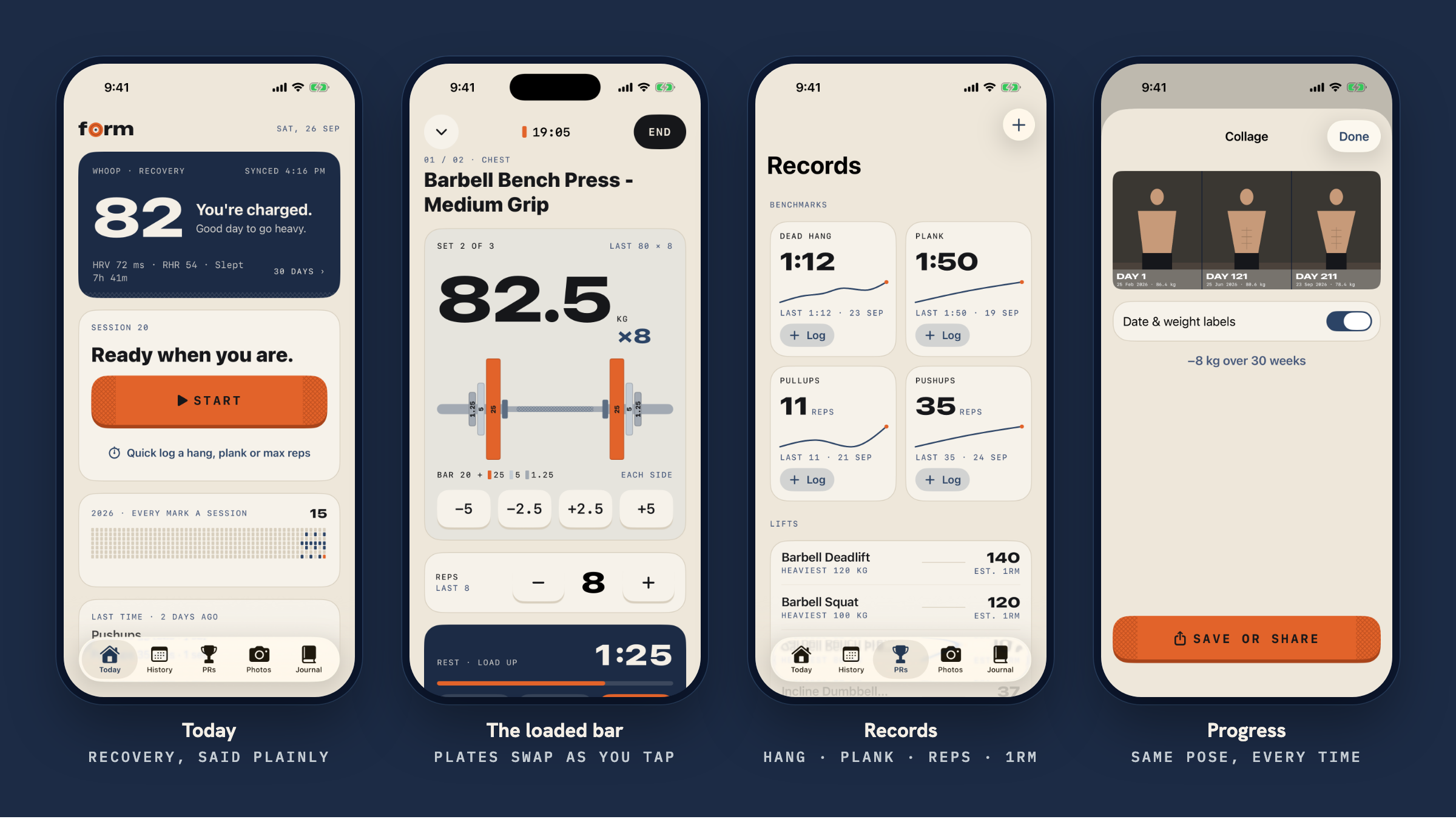
WHOOP data already gives us the insight on how much I can push. So, the Form should just say it plainly on the home screen: a number and a sentence, like "82, you're charged. Good day to go heavy."
The number in a list or graph doesn't motivate me that much. Because I'm used to it now. So, I decided to have photos as proof instead. After a session, take a pic(try to keep the same pose | ps. I'm very bad at posing. so, it makes it easier). Hopefully, this becomes the coolest to see the progress after weeks / months / years.
Design the UI
Again, since, the code is going to be written by AI. I thought let's work a bit on design as well. Again, Zero design idea. So, me x Claude went on design journey guided by the plugins and some comments from my end.
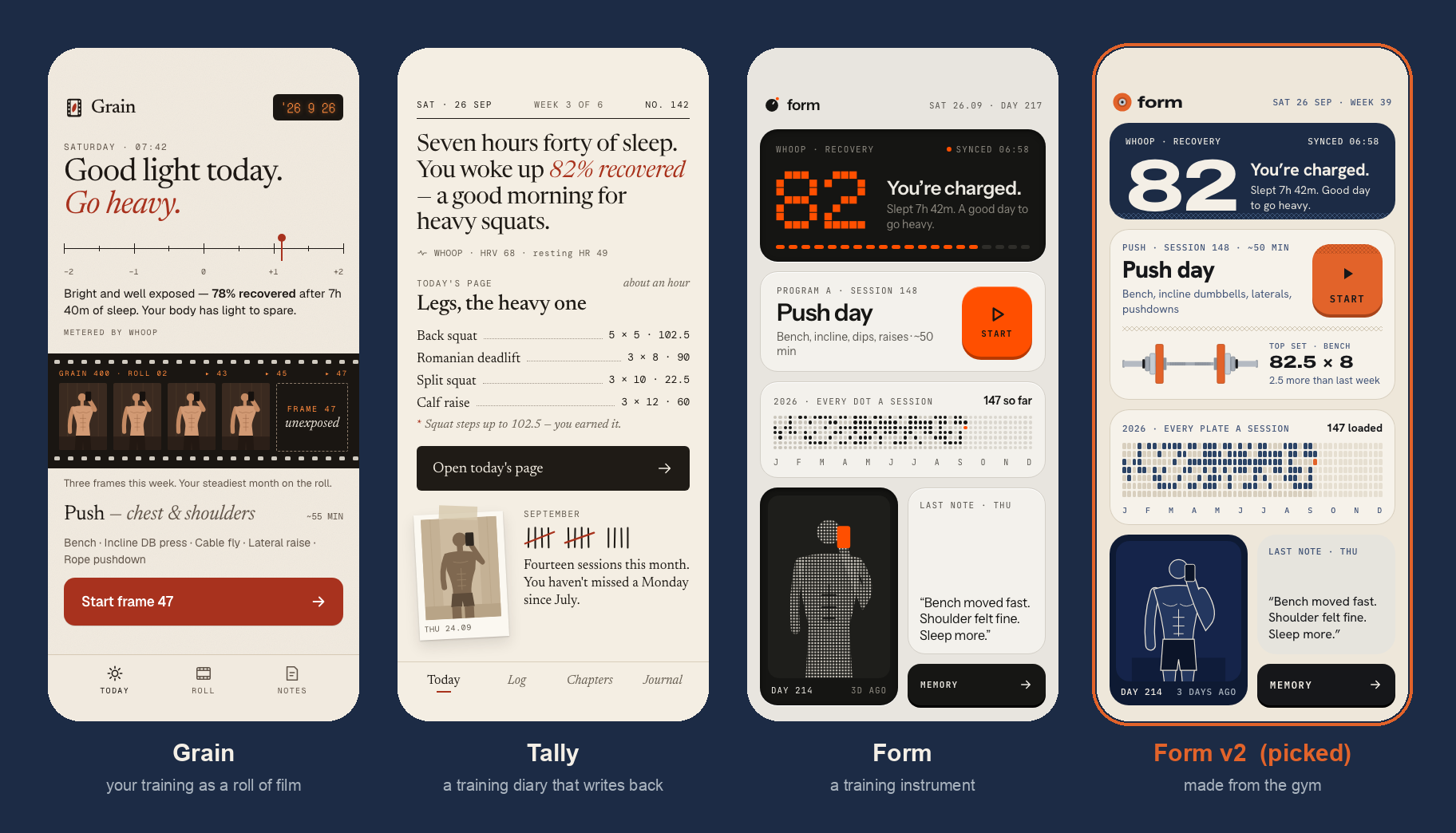
Claude built multiple clickable mock screens on a design canvas like a designer would do on figma. I was clueless on it. So, I gave all my thoughts what should it be and I asked to create multiple designs. It came up with 3 designs and names: Grain treats your training as a roll of film, Tally is a diary that writes back, Form is a training instrument.
I liked the Form design, which was inspired by Nothing's design language. But it was not quite my taste. So, I again provided some comments on how and what it should be. It came back with Form v2, "made from the gym." Each direction got its own Today, Workout, Progress and Finish screens.
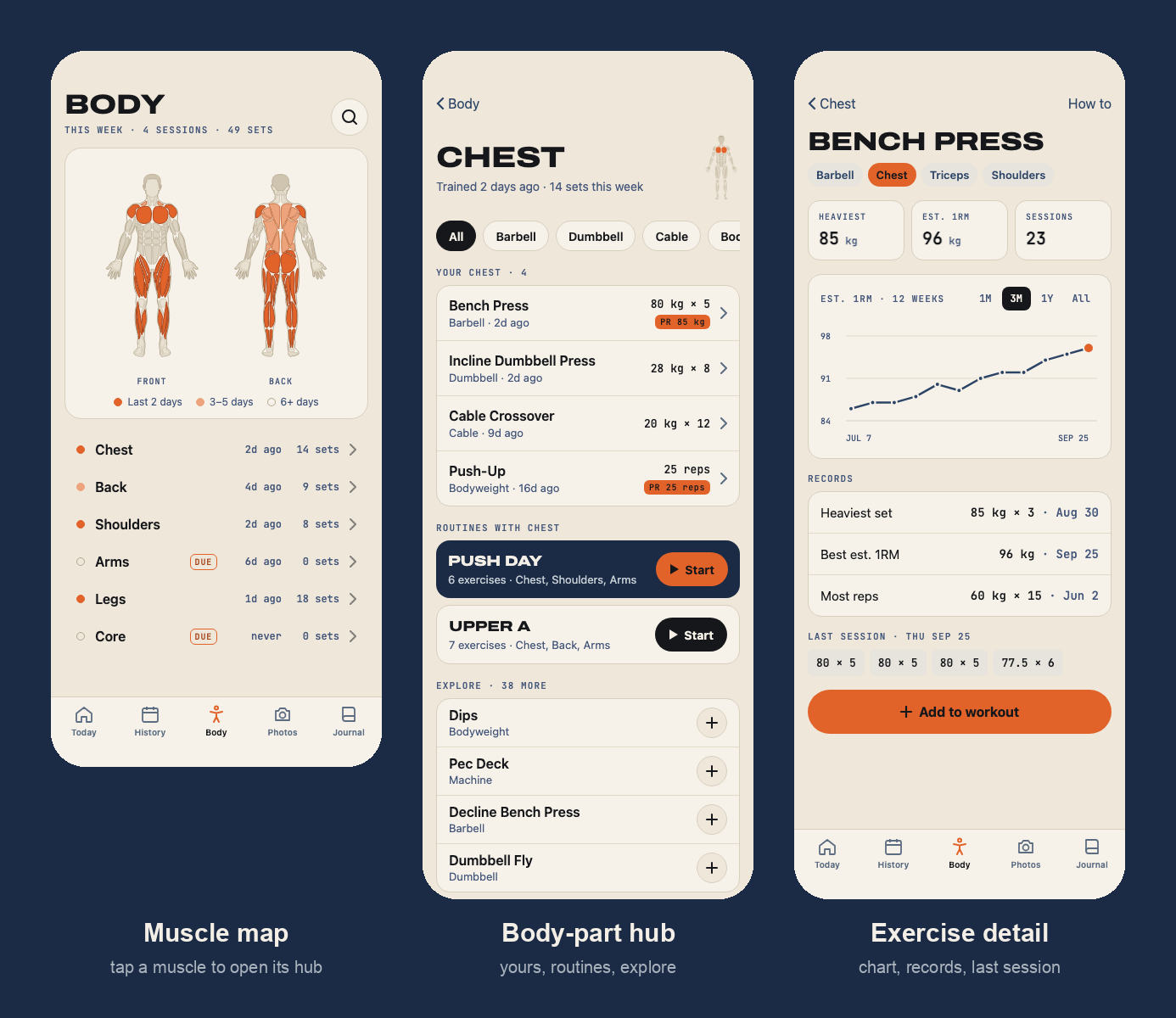
I kept working this way for later features. After building the initial functional app. I wanted to have a body part section as well to demonstrate what exactly is going on with my workouts and I don't miss anything or over-prioritize anything. I used this body highlighter.
Designing the architecture
Now that we've got the design fixed. It's about the time we take some architectural decisions. For an app like this and for personal use things. It comes down to a handful of question:
Q1. Where does the data live? The answer is kinda obvious, a place where we can manage auth, files and some other information about things. Supabase gives you all these things out of the box.
Q2. What happens with no signal? A bit thoughtful question, I've been to bunch of gyms where network becomes a concern. So, just for this specific reason every tap is written to a file on phone before touching to the network. If anything goes wrong, you should be able to just re-open the app and go on with the day. All the finished things (workouts x photos) wait in a queue and sync until it gets the internet connection back.
Q3. How do people sign in? Sign in with Apple. No passwords to store, and one tap on an iPhone.
Q4. What's stored, and what's worked out? It's your own DB. But in case, in future I decide to host it on the App Store. So, I decided, not store anything personal anywhere. The data is calculated from your activity history. the exercise library ships inside the app as file, so, there's no server table to keep in sync either. (it's a bit questionable, will come back to this in near future.)
Answer these, and the diagram more or less draws itself:
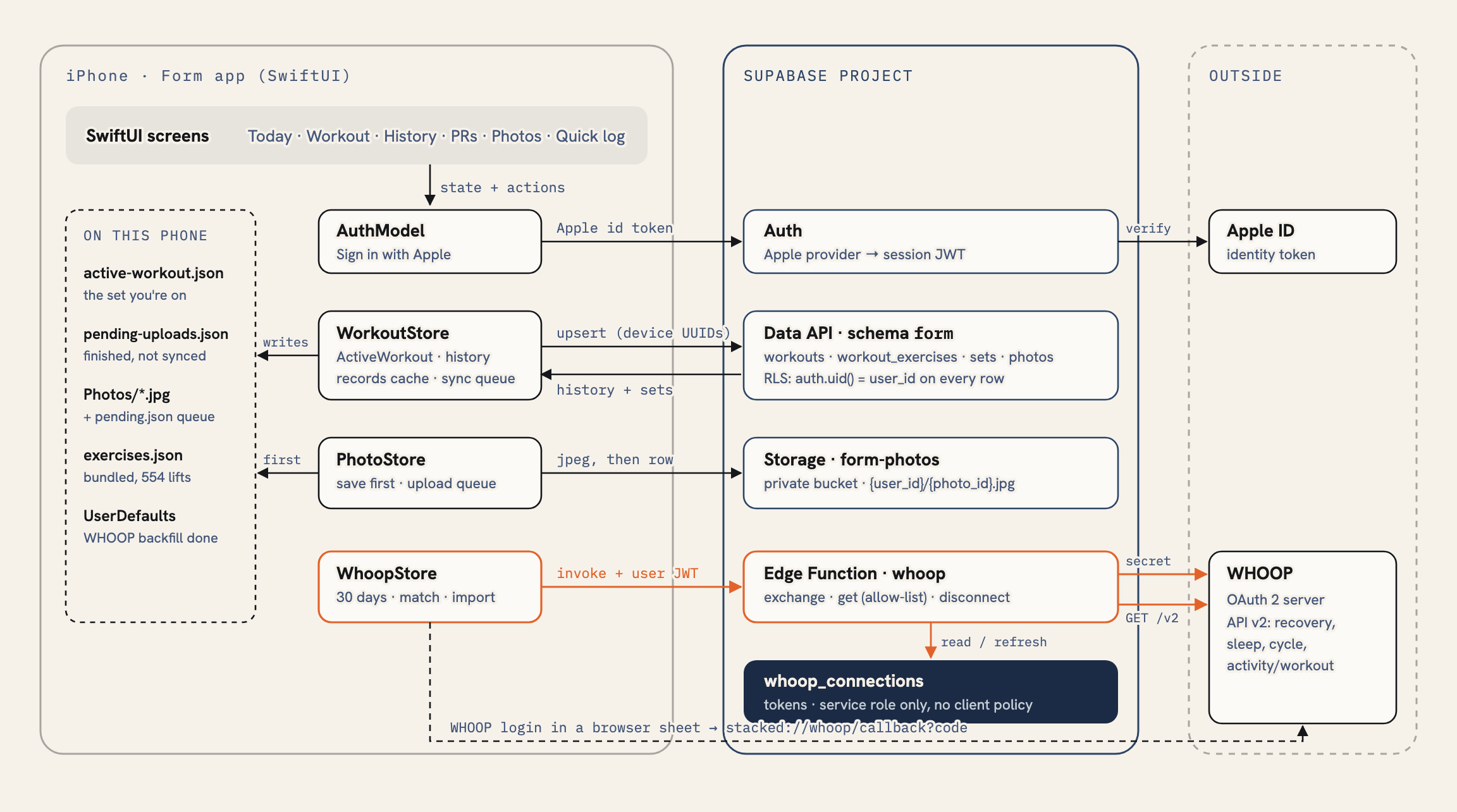
The full version, with the data model, sequence diagrams for logging, syncing, connecting WHOOP and taking photos, and the reasoning behind each decision, is in ARCHITECTURE.md.
Now, let's build this out
The first build, end to end
The first thing that I built was the whole core loop e2e. Sign in with Apple, starting a workout, log sets on the loaded bar screen, with last session's number filled in, rest timer between sets. Once finished, sync to Supabase, and see it in history. Around the same loop: WHOOP recovery on the Today screen, records tab for the benchmark, and progress photos with the ghost overlay. All, the things were done on Saturday EOD in about 10 steps(commits).
Sunday morning started with the first real bug and vibe coded issue. WHOOP refresh tokens are single-use, when the access token expired, the app fired up 4 WHOOP requests in parallel. Each one tried to swap the same refresh token, and as a result 3 of them failed and you'd see an error in the app. So, the fix was quite straightforward - only one request refreshes the token, and the rest wait for it and use the new one.
Then we moved onto creating custom exercises because that free exercise repo gives a bunch of exercise list. But it's not that great, because people have different names and some variation here and there. So, added a feature to create your own exercise, pick what a set records (weight and reps, bodyweight reps, or hold time), and it shows up everywhere in the app.
Adding the body map
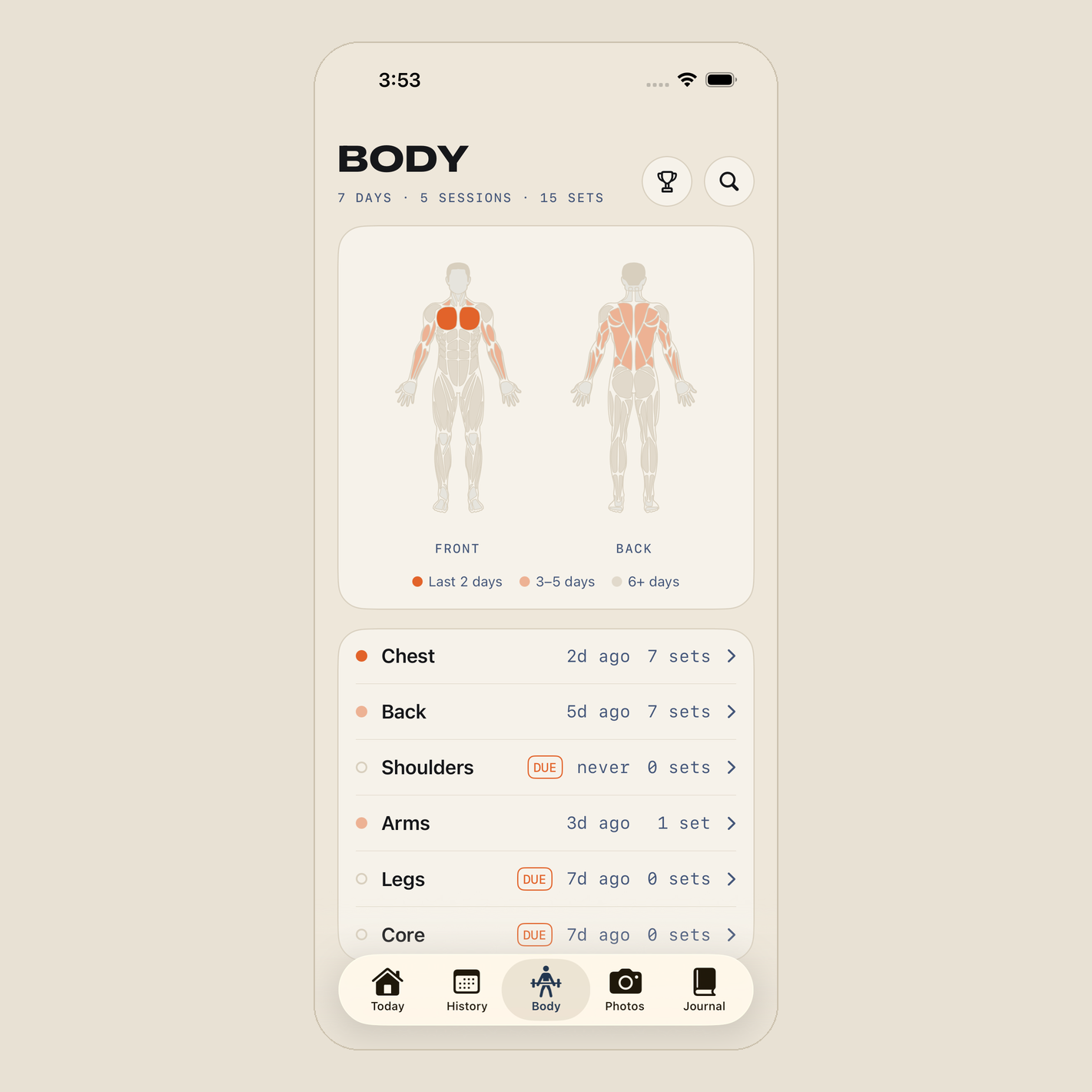
As, I said in design I wanted to see my training by body part. So, after discussing the placement for a while, it became a new body tab, replacing the records tab (the records moved behind a trophy button).
At the top, a front and back muscle map, each muscle tinted by how recently I trained it. Solid orange for the last two days, faded for three to five, grey after that. Below it, the six body parts with "trained 2 days ago, 7 sets" and a DUE flag on anything I've been skipping. Tap a muscle and you land on that body part's hub: the exercises I've done with my last set and best, then the rest of the library, one tap from being added to a workout.
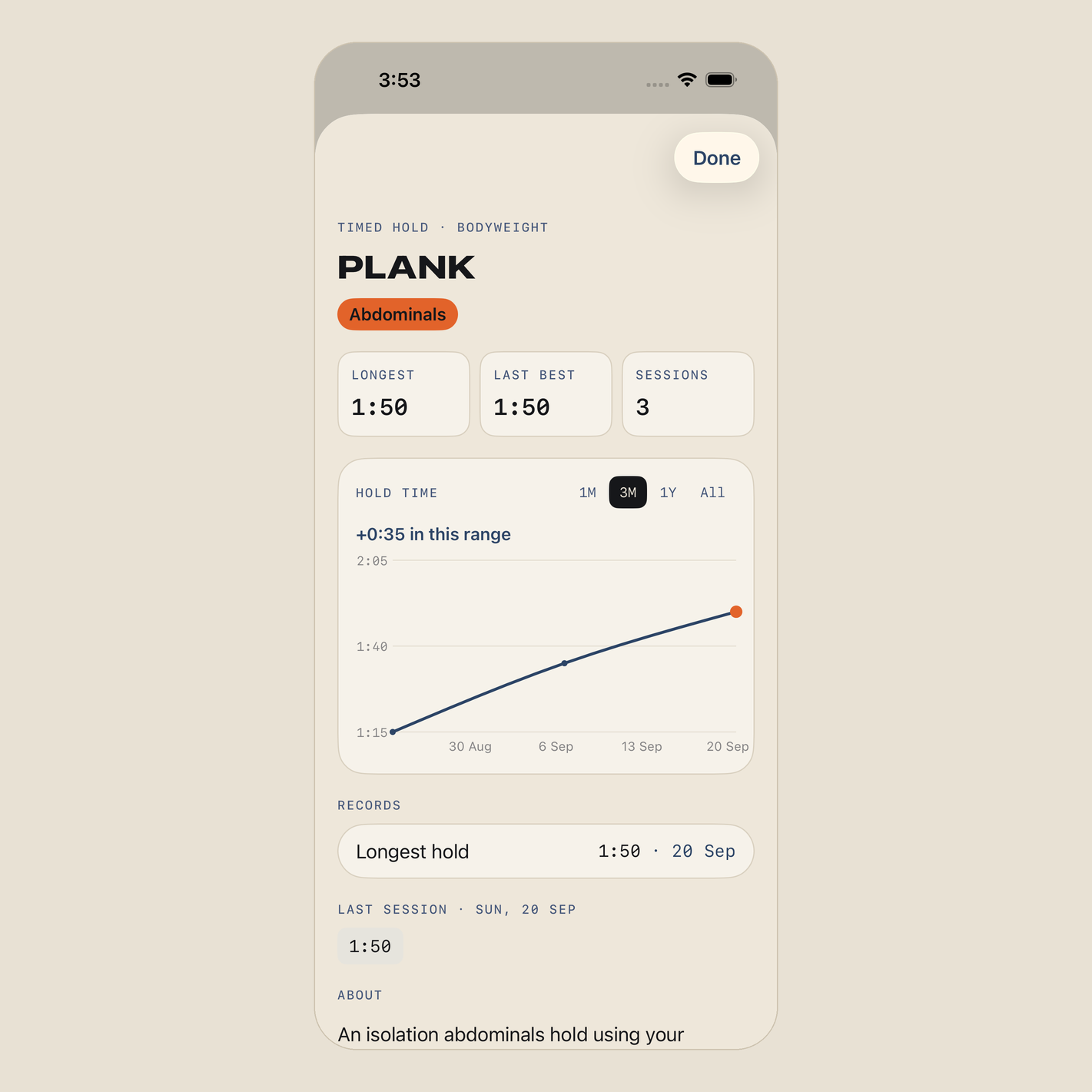
All the exercises also got a proper progress chart. Planks and dead hangs chart got based on hold time, push-ups x pull-ups got charts based on reps. Every record shows the date I set it.
Adding a scanner to log exercises
There are two issues, generally you do multiple exercises and adding one by one was hectic. These days, I mostly work out in group classes at Omni (one of the coolest gyms in Bali) where we go through about 10-12 exercises in an hour. Adding all of them will take another hour. So, I decided we need some sort of OCR to help us out over here.
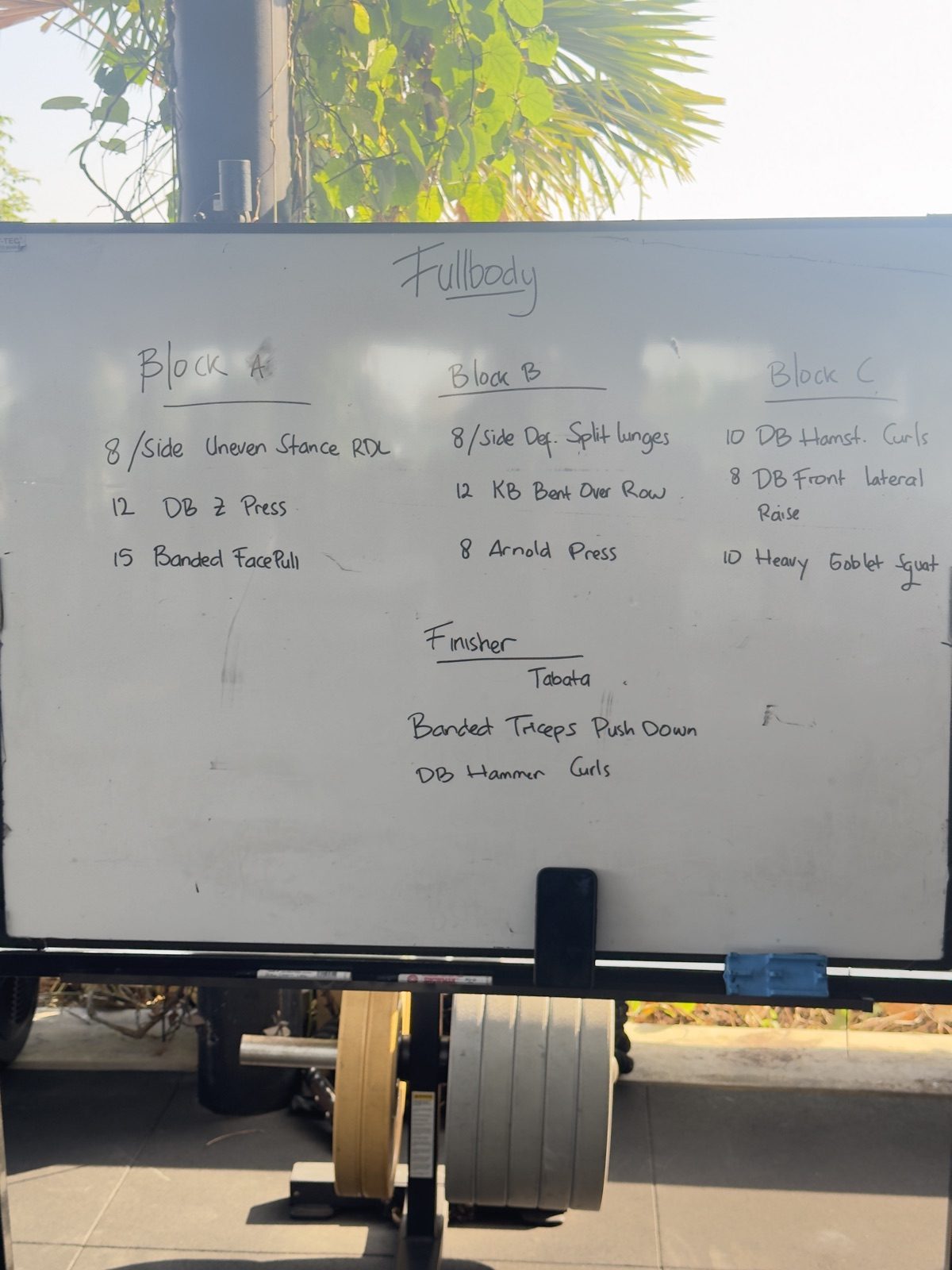
Getting that into a workout app is hectic. You're typing exercise names one at a time, between sets, with chalky thumbs, while everyone else has already started. It'd be so much easier to take a picture of the board and import the whole workout.
It should be able to read the text off the photo, then turn it into exercises. I searched around a bit myself and had Claude dig in as well. Then we talked through the options that were actually feasible.
One route was sending the photo to a cloud ocr x vision x AI model. That's likely the most accurate on messy handwriting, but it means an API bill, a network round trip, and a photo leaving my phone. The other was Apple's Vision framework, which recognises text, handwriting included, right on the device. Free, private, and it works in a gym with no signal. The question was whether it could read a coach's scrawl straight from the whiteboard.
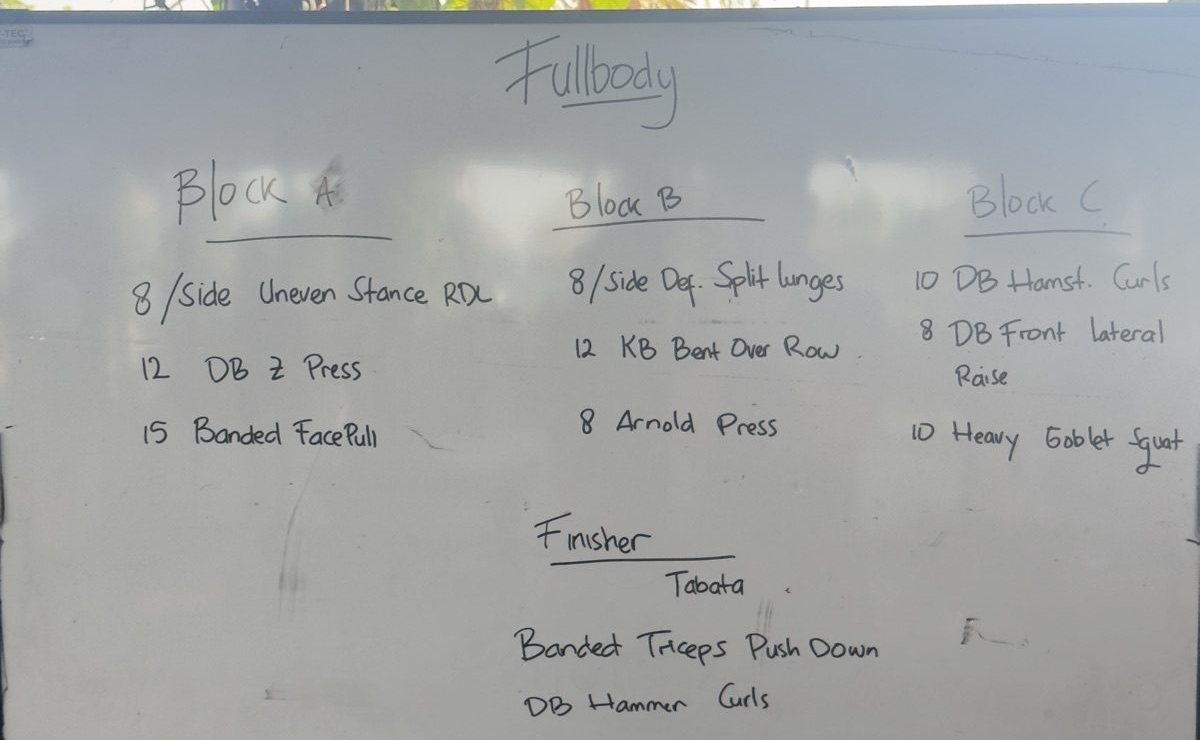
We settled on Vision, but checked first. Claude ran it on a photo of the actual board. Here's what came back, box by box:
- 1
Fullbody
- 2
BOck Afor “Block A” - 3
8/Side Uneven Stance RDL - 4
12 DB Z Press - 5
15 Banded Face Pull
- 6
Block B - 7
8/Side Def. Split Lunges - 8
12 KB Bent Over Row. - 9
8 Arnold Press - 10
Finisher - 11
Tabata - 12
Banded Triceps Push Down - 13
DB Hammer Curls
- 14
Block C - 15
I0 DB Hamst. Curlsa capital I for the 10 - 16
8 DB Front lateral - 17
Raisethe end of line 16, split off - 18
10 Heavy Goblet Squat
And it turns out to be nearly perfect. It read "Block" as "BOck" and the 10 as "I0," and split "Front lateral Raise" across two lines. But it's more than enough, I can spend this much time for correction. This brings an on-device Vision, no AI service, no API bill.
The rest was plumbing Claude was very good at:
- Apple's document scanner finds the board's edges and straightens the photo.
- A parser groups lines under their headings by column, pulls out rep targets like "8/side," and rejoins lines that wrapped.
- A matcher knows "DB" means dumbbell and "Hamst." means hamstring, and that "quat" is one letter away from "squat."
- A review screen shows what it's sure of, flags guesses with CHECK, and marks the rest No match.
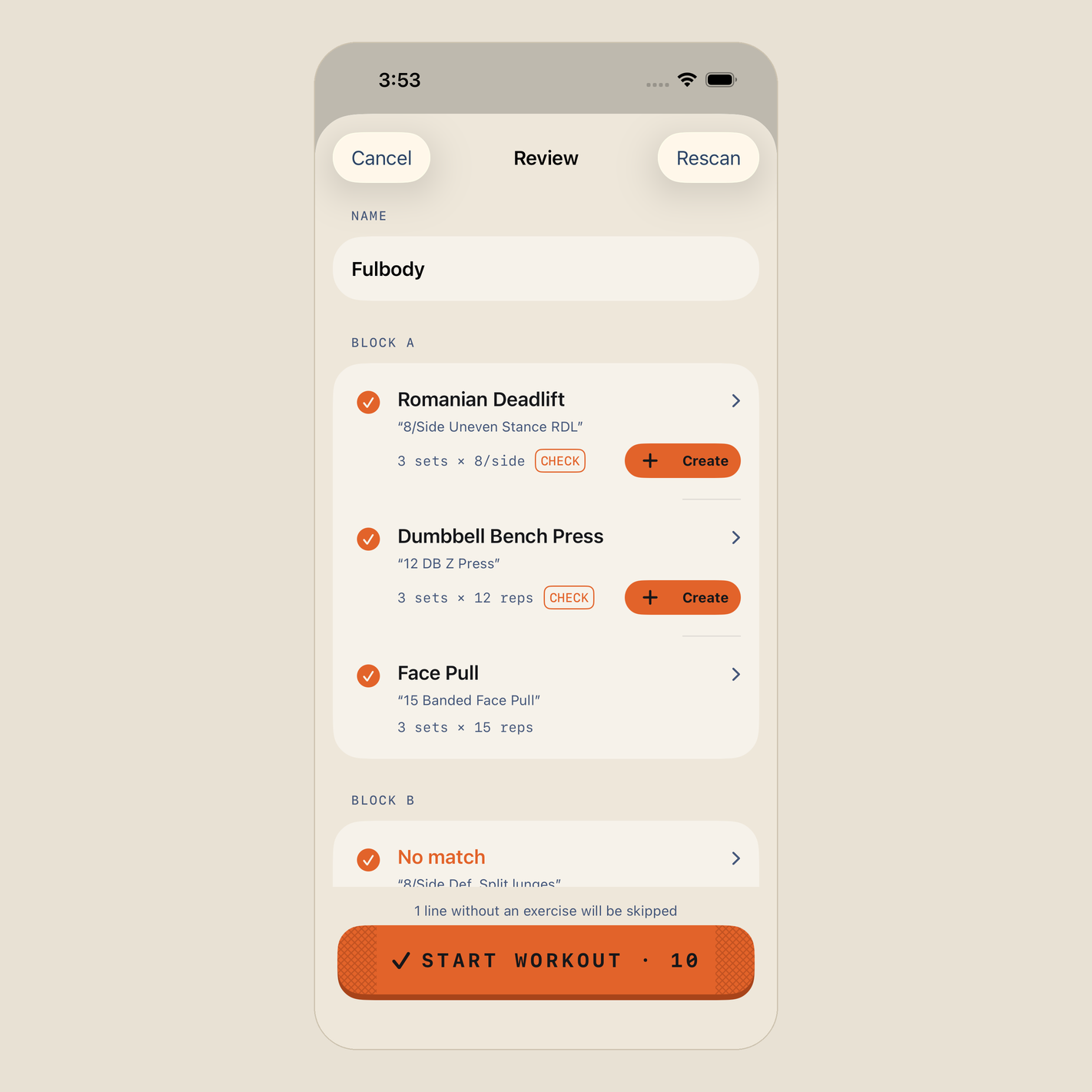
The design mentioned custom exercises as a side note. I pushed for more: "we should give an option to create custom exercise, bro." Now every uncertain line has a Create button right on it. Gyms invent exercises. "Uneven Stance RDL" isn't in any library. Once I've mapped a line, Form remembers it for next time.
And into WHOOP sessions
Also, WHOOP band already detects these activity in some sort of exercise or activity. So, I asked Claude to extend it there as well, just scan the board and it fills in what I did logged in the real time with WHOOP's strain and heart rate kept.
Where Form is now
Five tabs: Today, History, Body, Photos and a Journal that's still coming. It logs every kind of set, pulls in WHOOP recovery, strain and heart rate, takes progress photos with a ghost overlay, charts progress for every exercise, and imports workouts from a whiteboard photo.
Still to come: routines, the journal and Apple Health and some more corrections here and there.
Interested in it? Check it out on GitHub:
Form is on GitHub: github.com/divyanshugit/form. The README covers setup. There's also a demo mode that loads sample data, so you can try the app without a backend.
So, how much can you vibe?
You can literally vibe code anything in this age. You just need to be a better guide and have a taste on things(mine is not there yet 😄).
The AI wrote Swift faster than I can read it. What it couldn't do was make the calls for me: that the scanner should run on-device with no AI service, which body map to use, or that custom exercises were worth pushing for. You just have to come up with your need, and weigh the coding agent's suggestions against it.
Btw, most important question: Do I know Swift now? Maybe a little bit. I can read a SwiftUI view and more or less follow it as well. In the end, I can say that it's pretty nice weekend going off the rail for a bit trying new things. Since, two days ago, I didn't know a thing about building iOS app. Now, I've cool application working on my phone.
So, that's how much you can vibe, as long as you keep your eyes open and check what it builds.